> ## Documentation Index
> Fetch the complete documentation index at: https://docs.lute.gg/llms.txt
> Use this file to discover all available pages before exploring further.
# Interactive Trading
> Trade directly from Discord
Users with linked Discord accounts can interact with bot buttons for seamless trading without leaving Discord.
## Available Actions
### Quick Buy
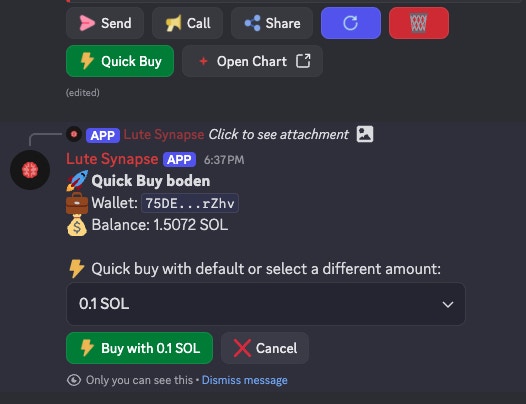
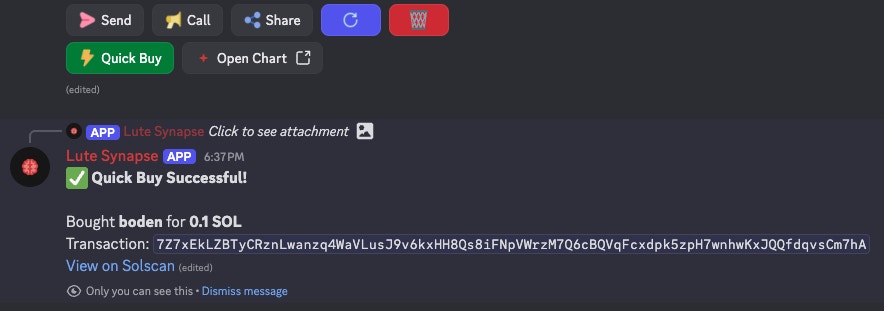
Execute trades with just two clicks - select your amount and confirm the purchase.
Choose from preset amounts or enter custom value
 Review and confirm your trade details
 ### Send Tokens
Share tokens directly with other Discord users through the bot interface.
### Send Tokens
Share tokens directly with other Discord users through the bot interface.
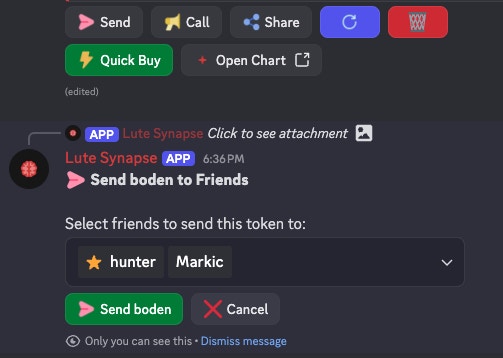 Recipients must have their Discord linked to Lute to receive tokens.
### Call & Share
* **Call** - Make trading calls to your community (earn 35% of fees!)
* **Share** - Distribute your referral links for additional earnings
## Account Linking
To access trading features, you need to link your Discord account to Lute:
Connect Discord in your Profile settings to enable trading features
Steps to link:
1. Go to Dashboard → [Profile](/dashboard/profile)
2. Connect your Discord account in Social Links
3. Return to Discord and start trading
Once linked, all your trades sync with your main Lute account, including portfolio tracking and rewards.
Recipients must have their Discord linked to Lute to receive tokens.
### Call & Share
* **Call** - Make trading calls to your community (earn 35% of fees!)
* **Share** - Distribute your referral links for additional earnings
## Account Linking
To access trading features, you need to link your Discord account to Lute:
Connect Discord in your Profile settings to enable trading features
Steps to link:
1. Go to Dashboard → [Profile](/dashboard/profile)
2. Connect your Discord account in Social Links
3. Return to Discord and start trading
Once linked, all your trades sync with your main Lute account, including portfolio tracking and rewards.